Trusted by tournament organizers across India

Run Perfect Karate
Tournaments Every Time

From student registration to live match scoring — manage your entire karate tournament from one powerful app. Kumite scoring, kata events, auto brackets, and everything in between.

500+
Tournaments Run
10K+
Athletes Managed
4
Languages
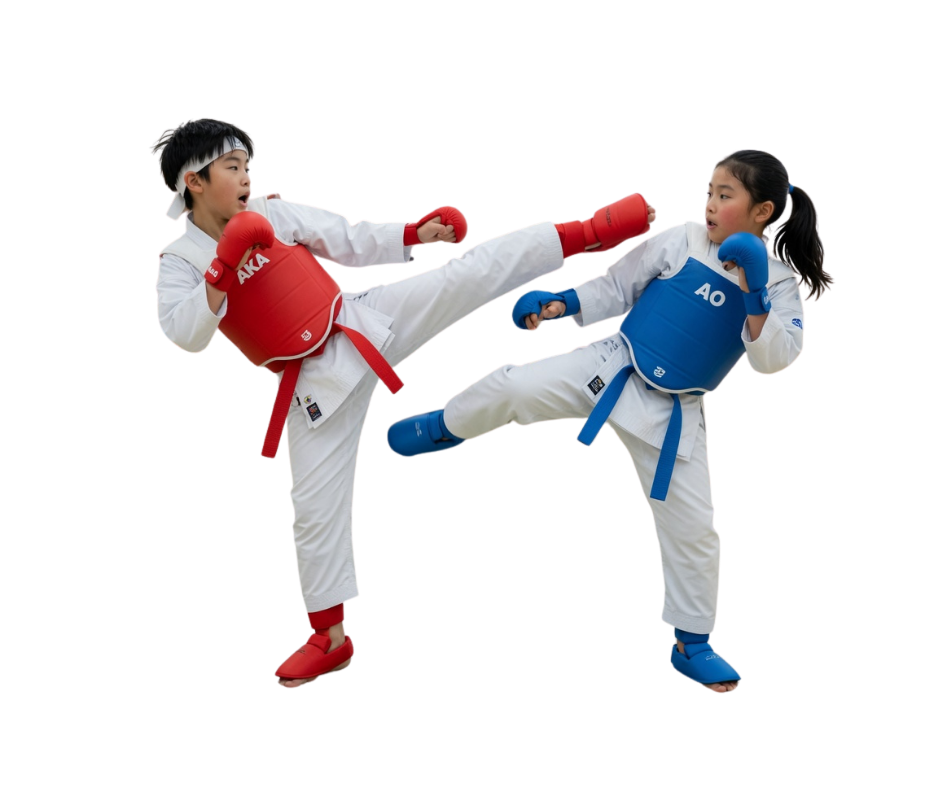
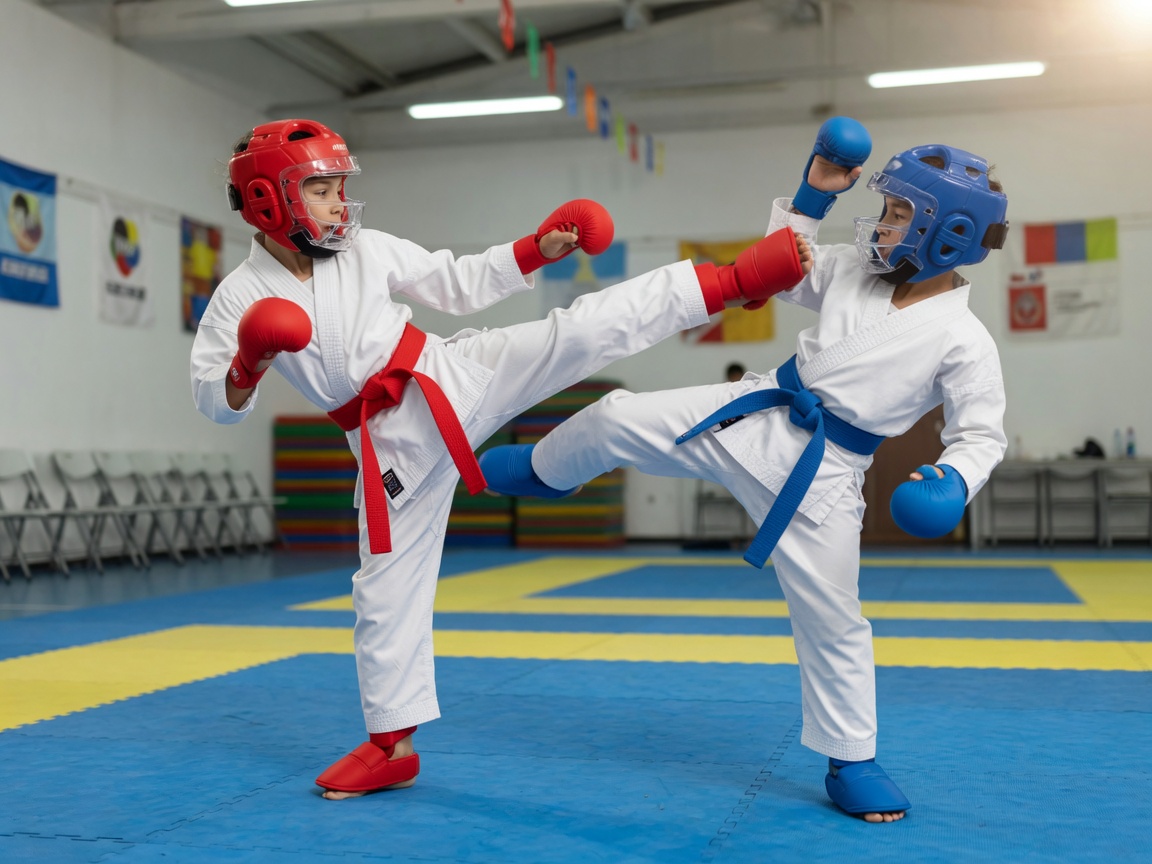
Two kids sparring kumite with AKA red and AO blue belts, helmets and gloves
Live — Tatami 1
LIVE
Emma Carter
AKA · Advanced
3 vs 2
Sophia Miller
AO · Advanced
🏆
Kata & Kumite
Live scoring

Karate Tournament Software —
Everything You Need in One App

Built specifically for karate, every feature is designed around how tournaments actually work — kumite, kata, multi-tatami, and beyond.

⚔️

Kumite Match Scoring

Real-time scoring with Yuko, Waza-ari, Ippon tracking. Penalties (Chukoku, Keikoku, Hansoku) and Senshu support built in.

🎌

Kata Event Management

Manage kata rounds with judge scoring, deduction system, and automatic ranking. Supports both elimination and round formats.

👥

Student Database

Store athlete profiles with belt level, age, weight, club, and photo. Bulk import via Excel or scan any printed or handwritten roster with your camera — AI reads names, belts, weights, and teams automatically.

📡

Live Real-Time Updates

Scores sync instantly across all devices. Co-admins on different tatamis see live updates simultaneously. Viewers with unlocked tournaments see live scores — no refresh needed. Live Matches also shows each pool's progress at a glance — "3 of 5 done · 2 remaining" — so you know exactly which mats need attention.

🔔

Viewer Notifications

Viewers get instant push notifications when a match starts and when it finishes — with the winner's name and result details.

🏟️

Multi-Tatami Support

Run multiple tatamis simultaneously. Assign co-admins to specific tatamis for parallel event management.

👤

Co-Admin System

Each co-admin is assigned to one specific tatami — they can score and conduct all matches only on that tatami. They cannot see or touch other tatamis. Admin creates the account, assigns the tatami, and retains full control including delete rights.

📺

TV / Big-Screen Display

Connect a TV or projector to each tatami and broadcast the live match full-screen — huge score, fouls, and Senshu — then the bracket tree and podium the moment a pool finishes. Auto-updates with zero clicks, built for spectators at the venue.

NEW
🔃

Move Pools Between Tatamis

Rebalance on the fly — if one tatami falls behind, move any pool over to a faster one in a couple of taps. Built-in safety checks block moving a pool that already has matches in progress.

📤

Excel & PDF Export

Export full results, brackets, pool lists, and score sheets to Excel or print-ready PDF for the venue desk.

📶

Offline Support

Score matches even without internet. Data syncs automatically when connectivity is restored — perfect for remote venues.

🌐

Multi-Language

Available in English, Hindi, Tamil, and Malayalam. Switch languages instantly from settings without restarting.

🏆

Auto Bracket Generation

One tap to shuffle and generate all brackets across Kata and Kumite. Smart distribution across tatamis — no manual grouping needed.

🤖

KarateAI — Instant Help Assistant

Get instant, intelligent answers about every app feature — right here on this website. Ask how to import students, set up tatamis, score kata, or anything else. KarateAI knows the entire app.

NEW
🔀

Smart Group Shuffling

Set group size (4, 8, 16 or custom) and the engine groups athletes by age, weight, and belt simultaneously. Byes are added automatically. Re-shuffle any individual group without touching the rest of the bracket.

📊

Reports & AKA/AO Sides

Student Roster, AKA/AO side assignments for Kata and Kumite, match summaries, brackets, pool print, and team medal table. Export print-ready PDFs in one tap.

🥇

Live Medal Tally

Gold, silver, and bronze are counted per club in real time as matches finish. The club leaderboard updates instantly — every admin, co-admin, and viewer sees the same live standings simultaneously.

🔢

Chest Number System

Auto-assign chest/registration numbers to every athlete. Numbers persist across re-shuffles. Print the full participant list from Reports for your registration desk — consistent throughout the event.

⚙️

Flexible Categories

Kata: age bands + Novice / Intermediate / Advanced (rank belts). Kumite: age + weight groups (e.g. Under 35 / 35–45 / Over 45) + Below Brown / Brown & Above. Import demo settings in one click to try a full sample setup.

🔒

Biometric App Lock

Protect tournament data with fingerprint or face ID. Configure auto-lock after an idle timeout. Change your password anytime right from Settings, plus full account and data deletion for complete privacy.

🙋

Team Manager Logins & Absentee Tracking

Invite each team's coach with their own login — they see their roster and can flag a no-show before the match even starts. Reports land in an admin review queue for bulk approve/dismiss, or an admin can search and mark a fighter absent directly. Confirmed absentees show up greyed out right in the pool and bracket, so byes go out instantly instead of everyone waiting on a missing fighter.

NEW
🚩

Kata 5-Judge Flag Scoring

Run flag-based kata head-to-head matches with a live +/− flag counter per side. The moment one side holds the majority — 3 of 5 flags — it's highlighted automatically so judges can confirm the winner in seconds. The flag count carries through to Completed Matches and every report.

NEW
📣

Call-to-Tatami Alerts

One tap on Live Matches sends an instant push to spectators — chest numbers and names of the next AKA/AO fighters, and which tatami to report to. No more athletes missing their call while they're away from the mat.

NEW
⏱️

Live Match Schedule & Expected Times

Set a start time plus per-match and relax duration for kata and kumite on every tatami. Each upcoming pool shows its expected start time right on Live Matches — and if a pool runs long or finishes early, every pool queued after it reschedules automatically, not a fixed rigid timetable.

NEW

My Fighter — Follow & Get Reminded

Parents and spectators can follow their son, daughter, or any athlete from the viewer menu. Their pool is highlighted right on Live Matches, and a reminder notification lands on the phone around their expected start time — no more sitting glued to the screen waiting for one name.

NEW

Four Report Types — Every Result Captured

Comprehensive tournament documentation at your fingertips — from individual athlete records to club medal standings. Export all as print-ready PDF in one tap.

👥

Student Roster

Complete participant list — belt, age, weight, club, chest number, and event entries. Print as a check-in sheet for your registration desk.

🥋

AKA / AO Side Assignments

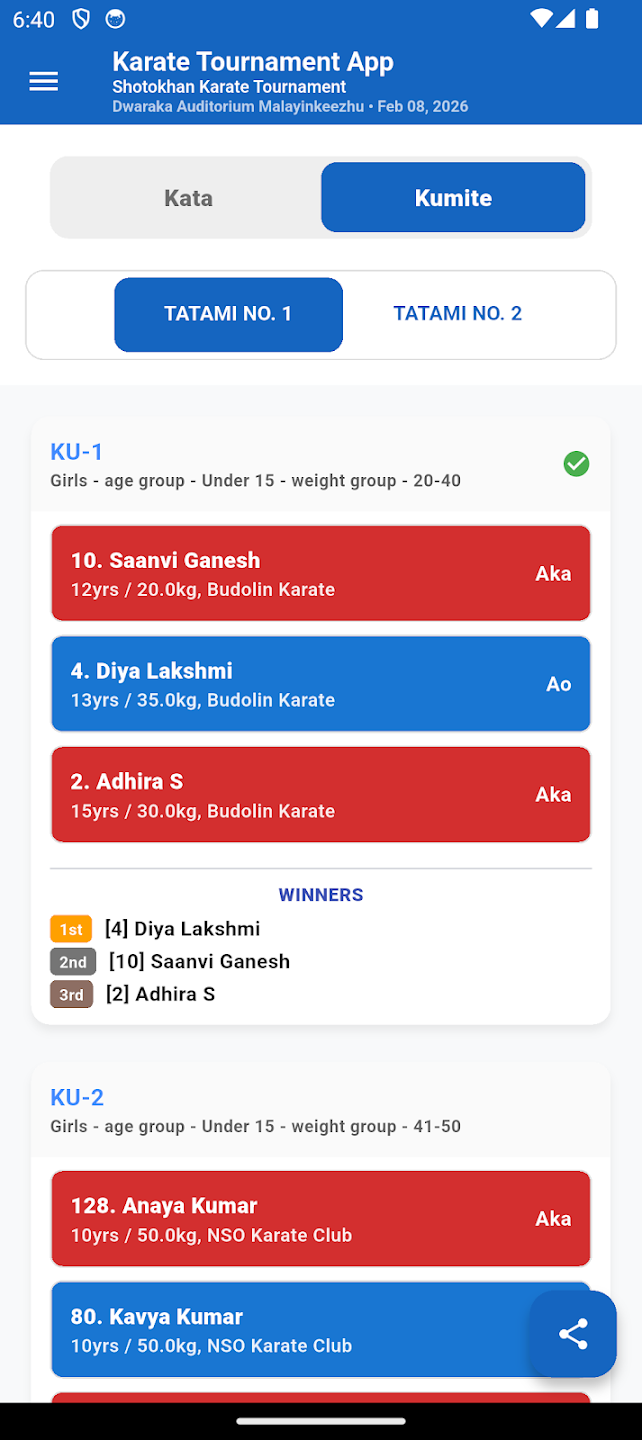
Match sides for Kata and Kumite pools — red AKA / blue AO from shuffle. Filter by event, team, or tatami. Print for the desk.

📋

Student Match Summary

Every match result per athlete — opponent, score, outcome, and round. A full performance record coaches and parents can review.

🏆

Team Overall

Club-level medal tally — gold, silver, and bronze counts with total points. Print the final standings for prize distribution and official records.

📥 Start Managing Reports Free

Real-Time Medal Tally & Tournament Progress

Gold, silver, and bronze accumulate live as matches finish. Club leaderboards update instantly across every device — no refresh needed.

  • 🥇Gold, silver, bronze counted per club automatically — no manual tallying
  • 📊Live progress bar — matches completed vs total at a glance
  • 📡Real-time sync — co-admins and viewers see the same live data
  • 📥Export the final medal table as PDF for official prize records
🏆 Medal Tally LIVE
CLUB
🥇
🥈
🥉
Kerala Karate Club
3
2
1
Delhi Academy
2
2
3
Chennai Tigers
1
3
2
Mumbai Dojo
1
0
2
Tournament Progress 68% · 34 / 50 sets

Meet KarateAI —
Your Tournament Expert

No manuals. No waiting. Just ask KarateAI anything about the app and get a clear, instant answer — whether you're setting up your first tournament or running your 50th.

  • 🥋 Step-by-step guidance for every feature
  • 📥 Import help — Excel formats, column names, troubleshooting
  • 🏟️ Tatami & bracket setup explained clearly
  • ⚔️ Scoring rules for kumite and kata
  • 👁️ Viewer access and wallet explained
  • 🌐 Multilingual — asks in any language, answers in kind
🥋
KarateAI
Online · Powered by Claude
Hi! I'm KarateAI 🥋 How can I help you with your tournament today?
How do I import students from Excel or scan a roster?
Two ways! Import (green button) picks an .xlsx file. Scan (blue button, mobile only) lets you photograph any printed or handwritten roster — AI reads the names, belts, weights & teams automatically. Review detected students, then tap Import!
What about belt groups for kata?
In Settings → Kata set belt groups: Novice (White–Orange), Intermediate (Green–Purple), Advanced (Brown–Black). Kumite uses Below Brown / Brown & Above. Or use Import Demo Settings for a full sample. 🎌
Ask anything about the app…

Karate Tournament App — See It In Action

Real screens from live karate tournaments — exactly what you'll see when managing your event.

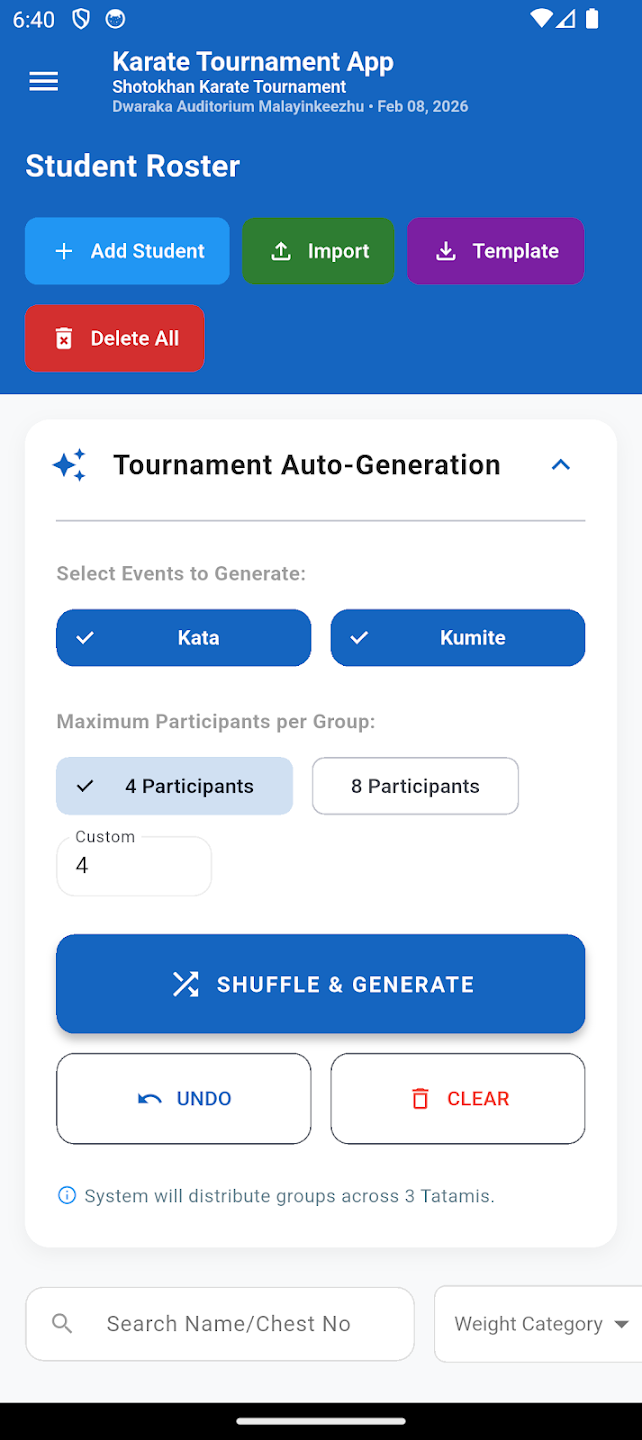
Student Roster and Auto-Generate Brackets

Student Roster & Auto-Generate Brackets

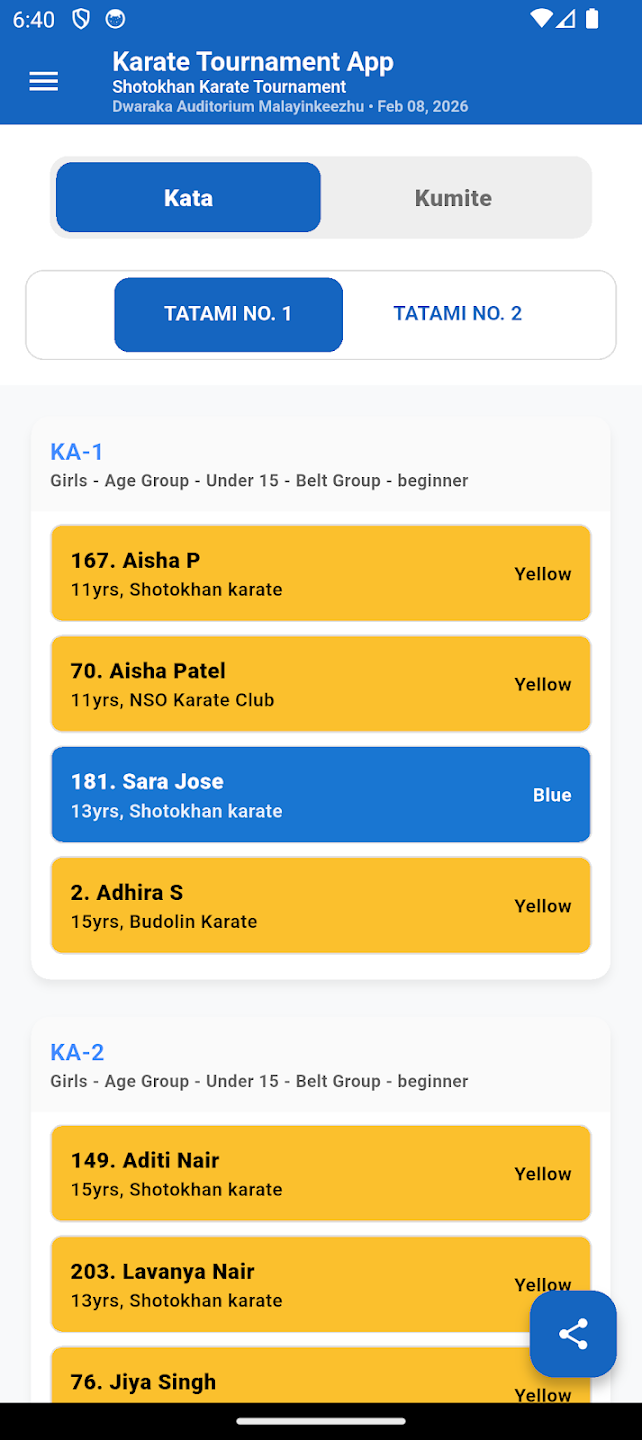
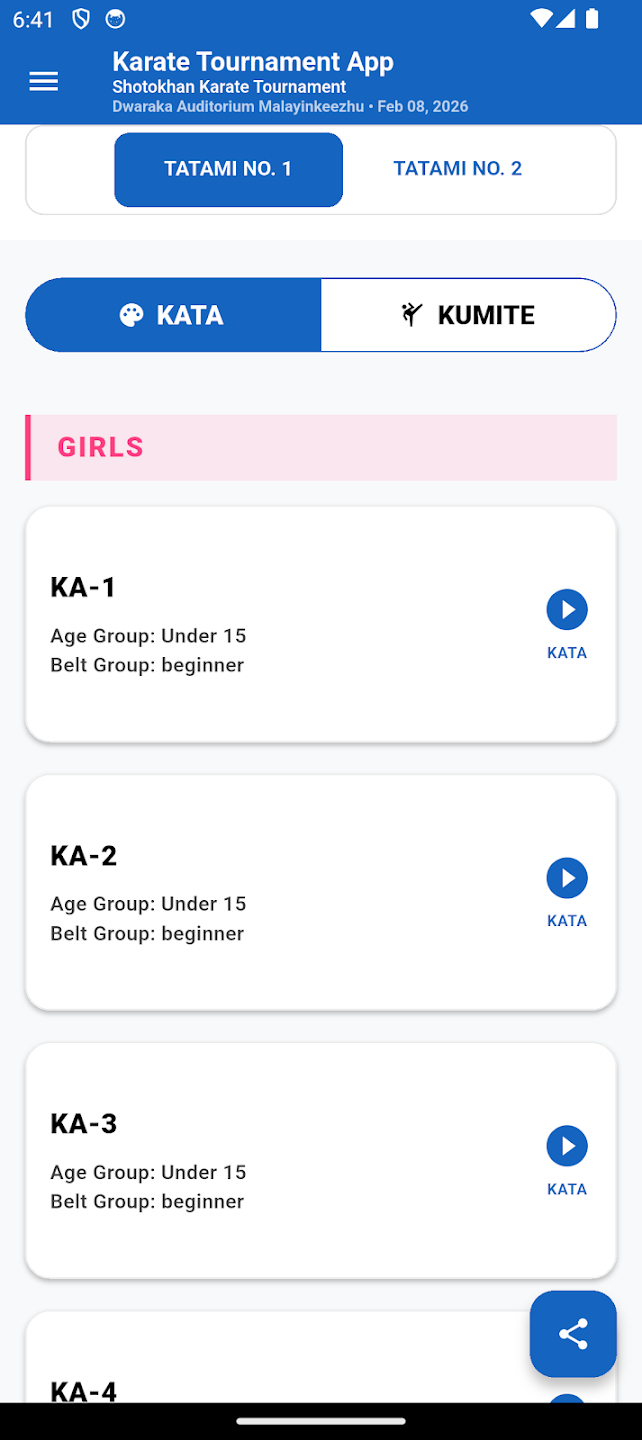
Kata Groups Tatami View

Kata Groups — Tatami View

Kumite Live Scoring AKA vs AO

Kumite Live Scoring — AKA vs AO

Tatami Overview Kata and Kumite

Tatami Overview — Kata & Kumite

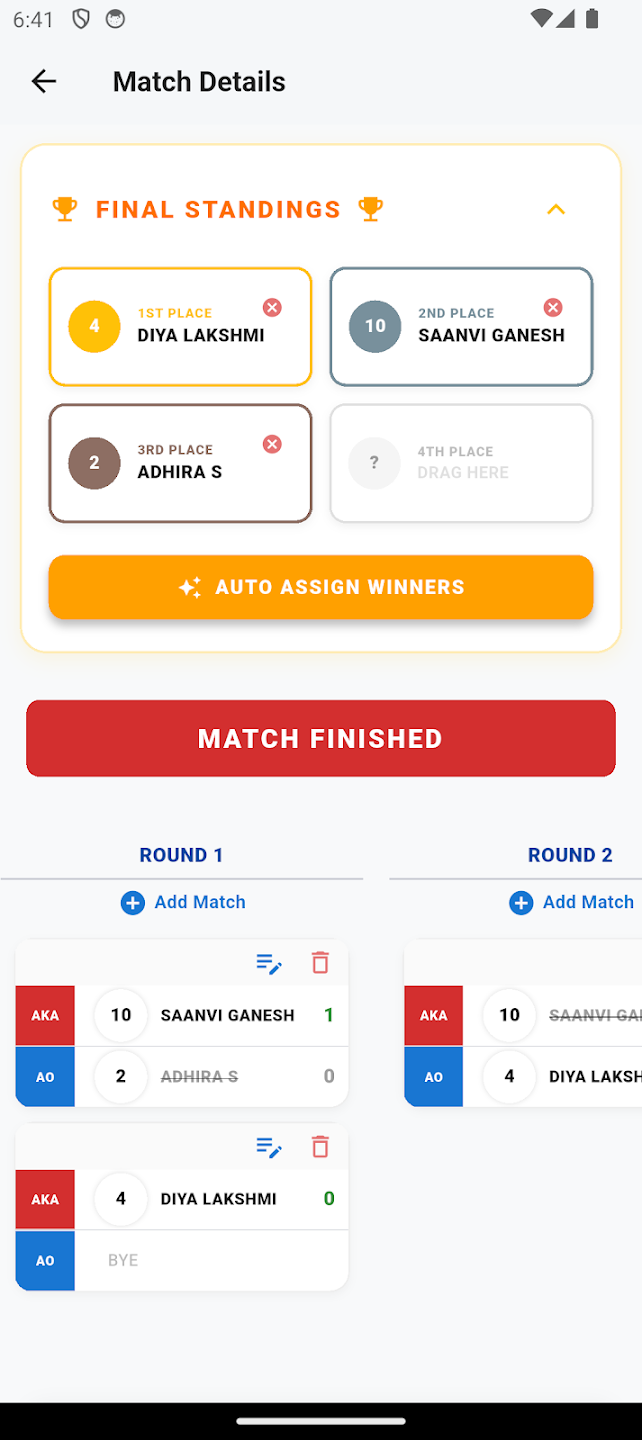
Match Details and Final Standings

Match Details & Final Standings

Intelligent Bracket Generation — Groups in Seconds

The tournament engine groups every athlete by age, weight, and belt simultaneously — then distributes brackets fairly across all tatamis. What used to take hours now takes one tap.

🔀

Group Size Control

Choose group size 4, 8, 16 or any custom number. The engine divides athletes into exact-size groups and fills byes automatically. Re-shuffle individual groups without touching others.

⚖️

Multi-Layer Grouping

Age → weight → belt — all three applied simultaneously. Boys and girls separated automatically. Athletes outside any category are flagged with a clear error, never silently skipped.

🏟️

Smart Tatami Distribution

Groups are balanced across tatamis — kumite sets go to kumite tatamis, kata sets to kata tatamis. Workload is evenly spread so no single tatami runs far ahead of the rest.

🔢

Chest Numbers Persist

Every athlete gets an auto-assigned registration number that stays fixed across all re-shuffles. Print the roster from Reports for your desk — numbers are consistent the whole day.

Two kids sparring kumite with AKA red and AO blue belts, helmets and gloves

Built for real athletes — every age, every belt

From kids in AKA/AO gear to black-belt finals, KarateHost runs clear tournament pools: age bands, weight groups, Novice / Intermediate / Advanced for kata, and Below Brown / Brown & Above for kumite — with live scores parents can follow.

  • Kata — head-to-head AKA vs AO, WKF or Total Sum scoring
  • Kumite — live timer, points, fouls, multi-tatami (Premium)
  • One setup — import roster, shuffle pools, print score sheets
Open the app →

Karate Tournament Setup — Ready in Minutes

Four simple steps to go from student registration to live match results.

1

Register Students

Add athletes manually or bulk import from Excel. Assign belts, ages, weights, and clubs automatically.

2

Create Tournament

Set ages, weight groups, and belt groups (Novice / Intermediate / Advanced for kata; Below Brown / Brown+ for kumite) — or Import Demo Settings. Free plan keeps 1 tatami.

3

Run Live Scoring

Score kumite and kata matches in real time. Co-admins handle separate tatamis simultaneously.

4

Export Results

Download full results, brackets, and reports to Excel or PDF and share instantly.

How to Conduct a Karate Tournament

A complete walkthrough — from creating the event to printing chest numbers. Follow these steps in order and your tournament will be ready to run.

💻
Setting up on a computer is much easier. Adding students one-by-one on a phone is slow, and the bulk Excel import is fiddly on a small screen. For setup — especially importing your full student roster from Excel — open karatehost.com/app on a laptop or desktop browser. It takes minutes instead of hours. Once everything is set up, use your phone on the day to run live scoring.
🧭
Where to find these screens: The Settings menu has five tabs — General, Categories, Kata, Kumite, and Generate. Set everything up there first, then open the Student Roster to add athletes before generating the draws from Settings → Generate.
📥
Want to try it out first? Download a ready-made sample roster of 50 students (.xlsx) and import it to explore pools, brackets and live scoring before entering your real athletes.
1

Create the tournament

This is the foundation of your event. Open Settings → General and fill in the tournament details:

  • Reg. No. — auto-assigned, you don't need to change it.
  • Host Name — your club or academy name (e.g. "Shotokan").
  • Venue — where the tournament is held.
  • Tournament Date(s) — one date for a single-day event, or add several for a multi-day event.
  • Country & State — your location.
  • Enable Public Live Access — turn this ON to let parents and viewers follow live results. If it's off, all results stay private to you and your co-admins.

Also on the General tab

Manage Tatamis, Co-Admins, prize points, and a one-click Import Demo Settings to load a ready-made sample setup.

2

Create your tatamis (mats)

A tatami is a competition mat. If your event runs on several mats at once, create one tatami per mat so matches can run in parallel.

In Manage Tatamis, type how many mats you have and tap Generate Tatamis. They appear as "Tatami No. 1", "Tatami No. 2", and so on. You can delete any you don't need.

Free vs Premium

Free plan: 1 tatami. Premium: unlimited tatamis, running matches on every mat at once.

3

Add co-admins for each tatami

Co-admins are your scoring helpers. Each one runs the matches on one mat, so you're not doing everything yourself.

In Manage Co-Admins, enter their Name, Email, and a Password, then pick which Tatami they will run, and tap Add Co-Admin. They simply log in with that email and password to score matches on their assigned mat. You can edit, reset, or remove a co-admin anytime.

One mat, one helper

A co-admin only sees and manages the tatami they're assigned to — they can't touch other mats or global settings.

4

Categories — already set up for you

Settings → Categories comes prefilled with sensible age, weight and belt-group divisions, so you can shuffle immediately with nothing to configure.

  • KATA beltsNovice (White, Yellow, Orange) · Intermediate (Green, Blue, Purple) · Advanced (Brown, Black). Boys and Girls separate.
  • KUMITE beltsBelow Brown Belt · Brown Belt and Above.
  • Ages — e.g. 6, 7, 8, 9, 10, 11–12, 13–14, 15–16, and 17–18 open (same ages for kata & kumite).
  • Weight = groups (ranges), not one category per kg. Example: Boy −35 / −45 / +45 means three groups: Under 35, 35–45, Over 45 for that age.

Need something different for your event? Every category here is fully editable — rename, resize, add or remove age bands, weight bands and belt groups.

Kata pool

Gender + Age + Novice / Intermediate / Advanced
No weight on kata

Kumite pool

Gender + Age + Weight group + Below Brown / Brown+
e.g. Boys · 11–12Y · Under 35 kg · Below Brown

5

Configure Kata

In Settings → Kata:

  • Scoring formatWKF (drop high & low, sum middle 3), Total Sum (all 5 judges), or the new Flag System — no numeric scores at all, judges just declare AKA or AO the winner directly.
  • Kata belt display — show each competitor's own rank belt color, or Aka/Ao red-blue sides like Kumite, on Pool view and Live Matches.
  • Kata list — keep official names Active, or add your style list.

Kata brackets are head-to-head with AKA vs AO — same pool card style as kumite.

Three scoring formats

WKF · Total Sum · Flag System (no scores, just a winner call)

6

Configure Kumite

In Settings → Kumite:

  • Match duration — e.g. 120 seconds.
  • Fouls — C1/C2/C3, HC, H, S pre-loaded — add, edit or deactivate any of them.
  • Age and weight groups come from the Categories tab (Step 4) — each weight line is a range for that age, and boy/girl cuts can differ.

Younger ages (e.g. 6Y) can be belt-only with open weight. Open kumite for 17–18 can use a single open weight group.

Example weight groups

11–12 Years
Boy: Under 35 · 35–45 · Over 45
Girl: Under 32 · 32–42 · Over 42

Each group + age + gender + Below/Above Brown = one kumite pool.

7

Set prize points

Decide how many points each placing earns. These points feed the live medal tally and club leaderboard. The defaults work well — e.g. 1st = 3, 2nd = 2, 3rd = 1, 4th = 1 — but you can change them to anything, from Settings → General.

Default points

1st = 3 · 2nd = 2 · 3rd = 1 · 4th = 1

8

Add your students

This is where most events are won or lost on time. Open the Student Roster. You have a few ways to add athletes:

  • Add Student — type one athlete at a time (fine for small clubs).
  • Template — download the ready-made Excel sheet (or grab our filled sample roster to try the app first).
  • Import — upload your filled Excel sheet to add everyone at once.
  • Scan — photograph a paper sign-up sheet and review the students it reads before adding them.
  • Renumber — re-assign chest numbers neatly (1, 2, 3…) after edits.

For each student you set Name, Age, Belt, Weight, Team and whether they're in Kata, Kumite, or both. Search by name or chest number, filter by weight, team, belt, and gender. Printed rosters are sorted by chest number for easy check-in.

⚠️ Do the Excel import on the web, not the phone. Downloading the template, filling it, and uploading is awkward on a mobile screen. On a computer at karatehost.com/app the same import takes a couple of clicks — download Template, fill in your students, hit Import, done.

Free vs Premium

Free plan: up to 50 students. Premium: unlimited.

9

Generate the brackets

This is the magic step — the app builds every group for you. Go to Settings → Generate — Kata and Kumite each have their own tab there:

  • Pick which Tatamis run this event and the max pool size (4, 8, 16, or 32).
  • One tournament date? Every age group is included automatically — nothing to check. Multiple dates? Tick which age groups run on each date; a group already scheduled on one date is blocked on the others so it can't be double-booked.
  • Tap Shuffle & Generate.

The engine builds pools as: Kata = gender + age + belt group; Kumite = gender + age + weight group + belt group. Spreads groups across your tatamis. Not happy with a draw? Tap Undo or Clear and shuffle again before the event starts.

Pool sizes

4 · 8 · 16 · 32 participants per pool

10

Print chest numbers — you're ready!

Finally, open Tournament Tools and tap Print All Chest Nos. This generates full-size, anonymous chest numbers for every athlete to wear during matches.

That's it — your tournament is fully set up. On the day, each co-admin logs in on their phone, opens their tatami, and scores matches live. A match not going ahead (injury, no-show) can be cancelled from its bracket card instead of deleted — it greys out and can be reactivated any time. Choose Girls-first, Boys-first, or alternating pool order from Live Matches, and viewers see the exact same order. The medal tally and leaderboards update in real time. 🥋

On match day

Live scoring, cancel/reactivate matches, custom pool order, real-time medal tally.

Start Setting Up Your Tournament →

Tip: open the app on a computer for setup. Need a hand? Visit the Help Center.

How Viewers Can See Live Data

Parents, coaches, and fans can follow any tournament live — brackets, match scores, and the medal tally update in real time, from any phone. Here's how a viewer unlocks and watches an event.

1

Find the tournament

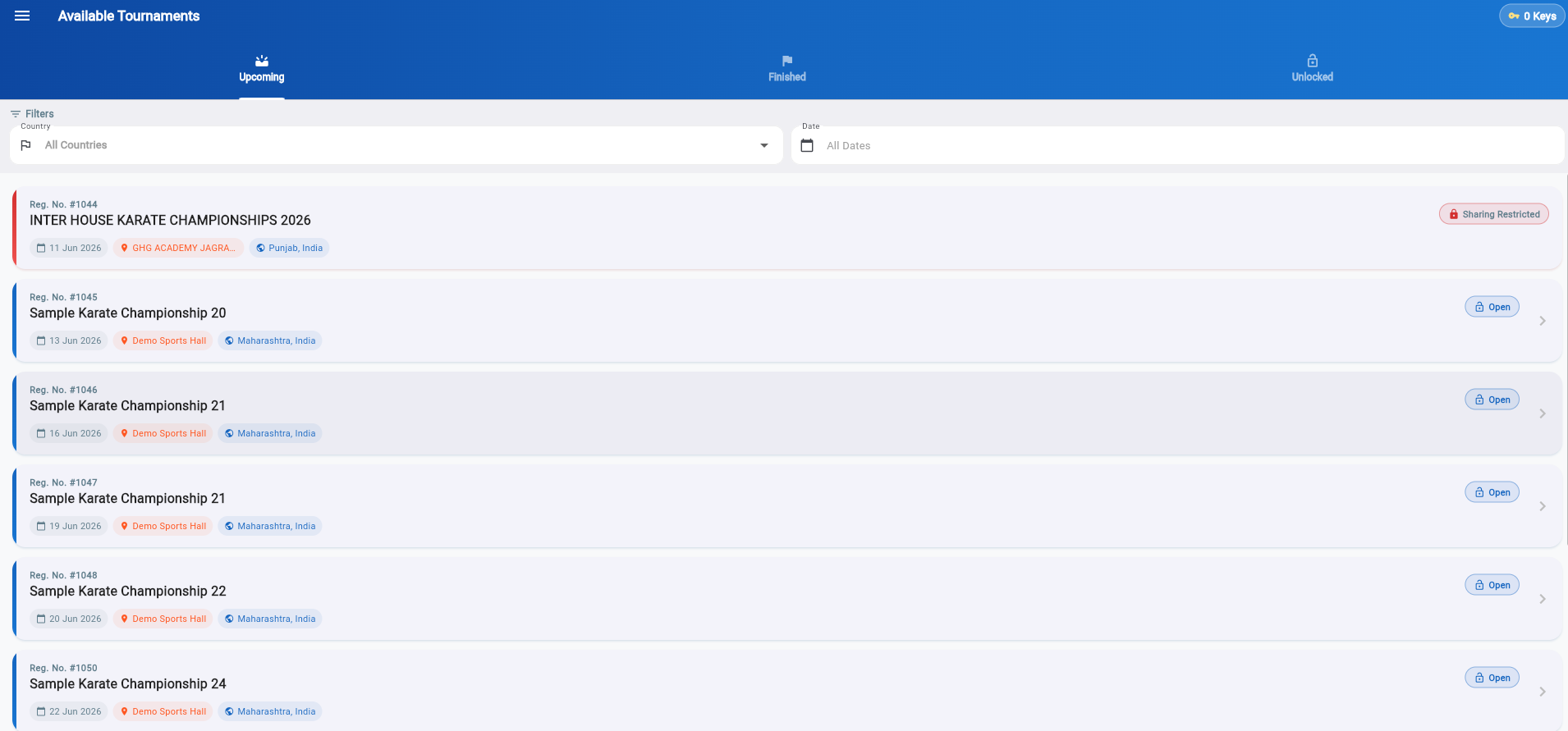
Open the app and go to Available Tournaments. Browse the tabs:

  • Upcoming — events that haven't started yet.
  • Finished — completed events with final results.
  • Unlocked — the tournaments you already have access to.

Use the Country and Date filters to find the right event quickly. A tournament shows an Open button (with a lock) when its host has turned on Public Live Access. If the host kept it private, you'll see "Sharing Restricted" and it can't be viewed.

Available Tournaments list — Upcoming, Finished, Unlocked tabs with Open and Sharing Restricted states
2

Unlock it with a Tournament Key

To see a tournament's live results and brackets, you unlock it with a Tournament Key. One key unlocks one tournament for lifetime access — pay once, watch forever, including after the event ends.

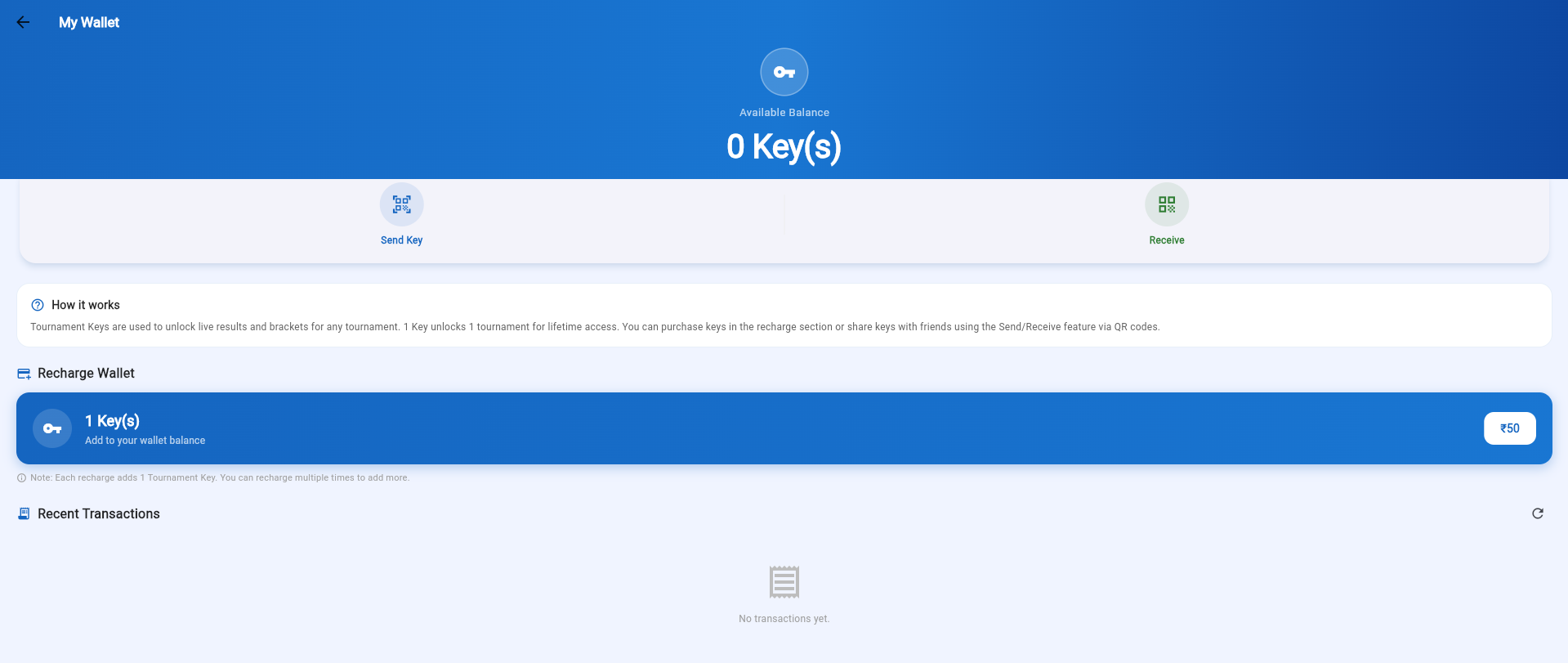
Check your balance in My Wallet. To buy a key, go to Recharge Wallet and tap ₹50 — each recharge adds 1 key, and you can recharge multiple times to stock up. Tapping Open on a tournament uses one key to unlock it.

My Wallet — Tournament Keys balance, how it works, and Recharge Wallet at ₹50 per key
3

Or receive a key from a friend

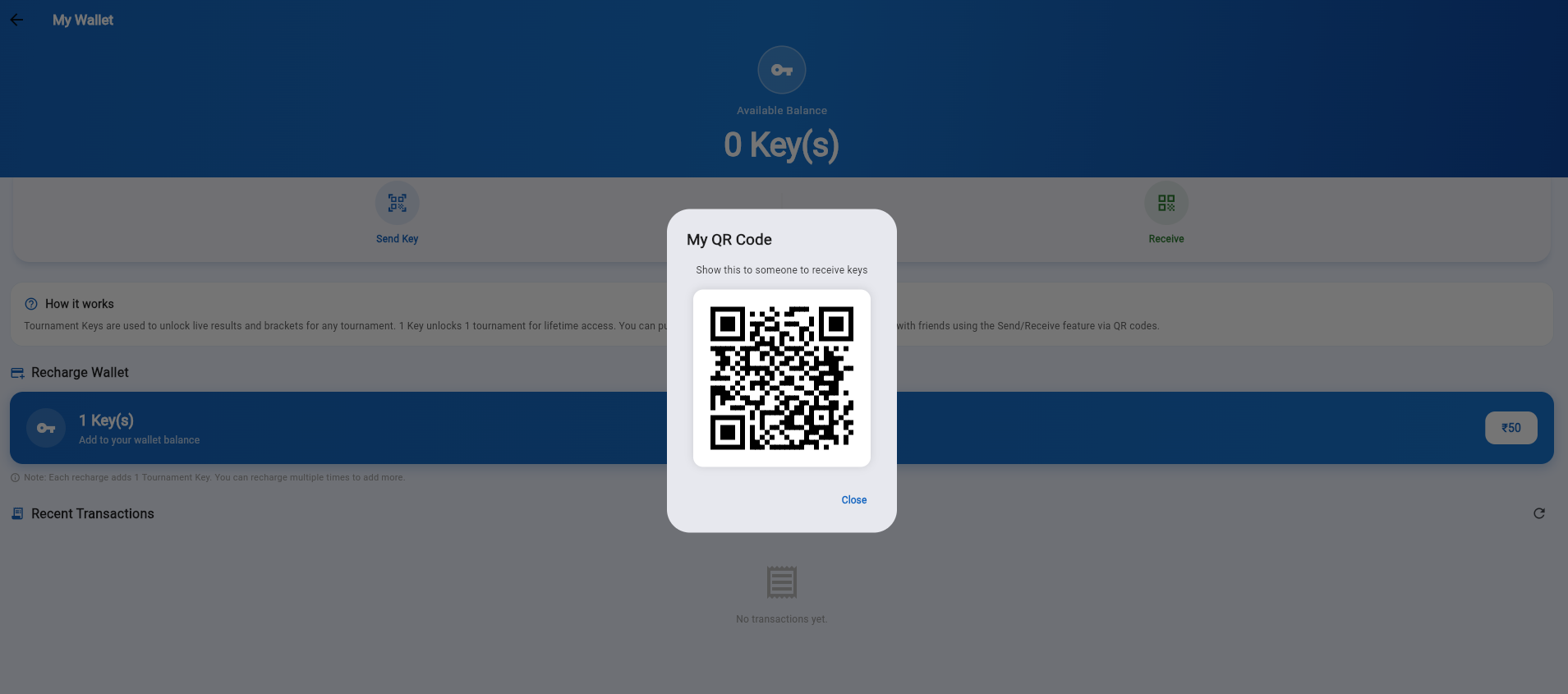
Keys can be shared — perfect for a club that buys keys in bulk and hands them out to parents. In My Wallet tap Receive to show your personal QR code. A friend who has keys taps Send Key, scans your QR code, and a key transfers to you instantly — no cash, no waiting.

My QR Code dialog — show this to receive Tournament Keys from a friend via Send/Receive
4

Watch the action live

Once unlocked, the tournament moves to your Unlocked tab. Open it to follow everything in real time:

  • Live match scores as each kumite and kata bout is judged.
  • Brackets showing who fights whom and who advances.
  • Medal tally & club leaderboard updating the instant a result is saved — no refresh needed.

You can follow from anywhere — the stands, home, or another city. Access is lifetime, so the results stay available long after the event finishes.

Unlocked tournaments are followed live from the Available Tournaments screen
Open the App & Watch Live →

Hosting an event? Turn on Enable Public Live Access in Step 1 of the setup guide so viewers can find it.

Simple, Transparent Pricing

Start free. Upgrade when you need more power.

Free
₹0 forever
Perfect for small clubs and practice tournaments.
  • Up to 50 students
  • 1 tatami (court)
  • Kumite scoring
  • Kata events
  • Excel import/export
  • Unlimited students
  • Multiple tatamis
  • Watermark-free PDFs
Get Started Free
Viewer Access
₹50 / tournament
For spectators, parents, and coaches who want to follow live results.
  • Live match scores
  • Notifications — match start & winner
  • Brackets & results
  • Student list (read-only)
  • 1 mobile + 1 desktop
  • Edit or score matches
Key provided by organizer or purchase directly in-app
Sign In as Viewer

Available on Android & Web · Purchase Premium via Google Play (Android) or Razorpay (Web)

Trusted by Karate Coaches &
Tournament Directors Across India

★★★★★

"We ran a 200-athlete state championship with 4 tatamis and zero confusion. The live scoring kept everything moving smoothly."

R
Rajesh Menon
State Championship Director, Kerala
★★★★★

"Importing students from Excel saved us hours of manual entry. The duplicate detection caught entries we would have missed."

S
Sunita Sharma
Head Coach, Delhi Karate Academy
★★★★★

"Tamil language support made it so much easier for our local coaches to use. The offline mode worked perfectly at our venue."

K
Karthik Selvam
Tournament Organizer, Tamil Nadu

Available on Android & Web

Install from Google Play or Indus App Store for the full native experience, or open the web version instantly from any browser — no installation needed.

Latest: v1.1.35  ·  Android & Web  ·  Actively maintained
Scan to download Karate Tournament App

Scan to Install

Opens Google Play Store

Get in Touch

Have a question or need help? We respond within 24 hours on working days.

Sajan Thesis Works 🙏

Builders of Karate Tournament App — professional tournament management software trusted by organisers across India.

📍
Address
3/245/B, Nedungottil House, Moongode,
Near Puthuval Devi Temple,
Trivandrum – 695573, Kerala, India
📱
Phone / WhatsApp
+91 94950 84610
✉️
🕐
Support Hours
Monday – Saturday, 9 AM – 6 PM IST
🏛️
Business Registration
Udyam Reg: UDYAM-KL-12-0069167
D-U-N-S Number: 771974696

Send us a message

We respond within 24 hours on working days.

Ready to Run Your Next Tournament?

Join hundreds of karate organizers who use Karate Tournament App to run flawless events.

🥋 Start for Free — No Credit Card